
Parlez Bien
AI Language Learning PWA
The Problem
Every day, language students leave class carrying something valuable and fragile: fresh grammar rules, new vocabulary, and a teacher's correction still ringing in their ears. Within hours, most of it is gone.
This does not happen because students are lazy. It happens because the bridge between passive classroom learning and active oral production doesn't exist.
Duolingo teaches generic vocabulary in isolation, disconnected from today's lesson. Private tutors are expensive and unavailable at 1pm on a Thursday. Language exchange apps require performing fluency in front of a native speaker before you have any — the exact moment of maximum psychological vulnerability.
The gap isn't access to language content. It's access to a safe, contextual, low-stakes space to speak the specific thing you just learned, before the memory fades and the confidence window closes.
No existing tool solves for the post-class hour. Parlez Bien does.
The Users
I designed Parlez Bien around two distinct personas, built from direct observations and conversations with students in Montpellier:
- Amara — The Immersion Student (24, Montpellier): She has grammar class at 9am and oral production at 2pm. The gap between those two sessions is where Parlez Bien lives. At 12:50pm she is cognitively exhausted, sitting in a café, knowing what she studied but not whether she can say it. She wants something that meets her exactly where she is, not generic templates.
- Daniel — The Global Learner (31, Ghana): Daniel is learning French independently for career progression. His problem is different: he has no one to practice speaking with. He studies in the evenings, understands his vocabulary, and never says it aloud. The gap between knowing French and being able to use it widens every week.
Both users share one core job to be done: practice speaking the specific thing they studied today, without needing another person to be patient with them.
The Product Decision That Defined Everything
Most language apps treat correction as the primary value — find the error, flag it, fix it.
I made a different decision: comprehension first, correction second.
This comes directly from language acquisition research and from my Masters work in Responsible AI. Premature error correction increases learner anxiety and reduces oral output. A student who communicated their meaning — even imperfectly — has succeeded at the primary goal of language use.
The AI tutor in Parlez Bien is instructed never to correct mid-conversation, to model correct forms naturally through a technique called recasting, and to provide a maximum of two corrections per session — always delivered after confirming what the learner got right.
This is not a UX decision. It is a pedagogical and ethical one. It defines the entire feedback architecture.
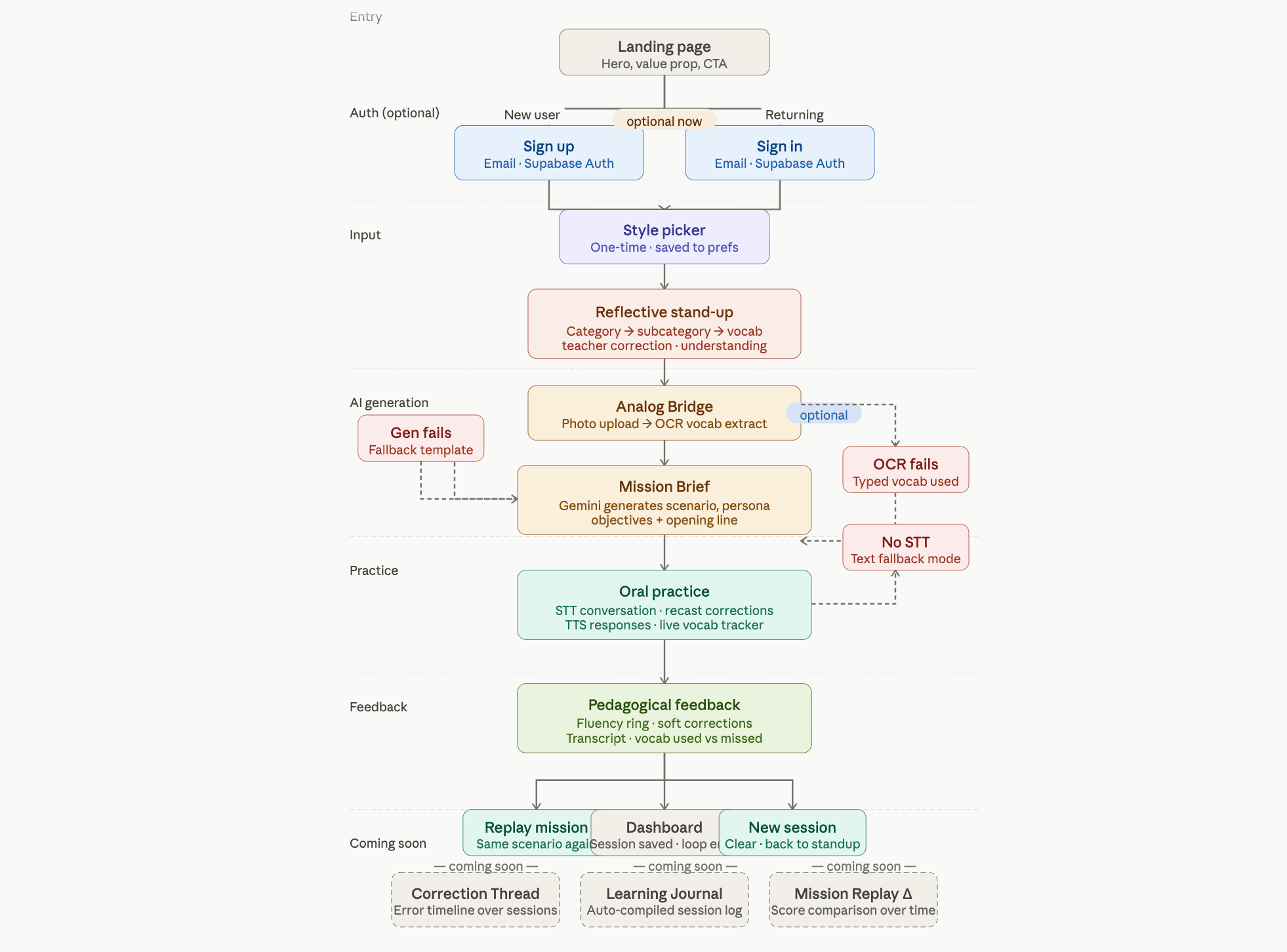
The Workflow
- The Reflective Stand-up: A guided interface with a conversational, branching question structure. The learner selects what category they studied (grammar, conjugation, vocabulary), then specifies the subcategory (e.g. Conjugaison → Subjonctif présent). They describe their highlight, add new vocabulary, and enter the one correction their teacher flagged. This takes under 5 minutes and produces structured, specific data that drives the AI mission.
- The Analog Bridge (Optional): A photo upload feature using Gemini's multimodal vision capability to extract vocabulary from handwritten classroom notes. This bridges the gap between analog learning and digital practice — a student's scribbled margin notes become AI-legible vocabulary, folded into the mission alongside their typed answers.
- The Mission Engine: A Gemini 1.5 Flash API route that receives the reflection data and generates a single, highly specific roleplay scenario — not a generic conversation practice template, but a situated scene (a market negotiation in Lyon, a flatmate agreement in Bordeaux) that creates natural opportunities to use today's exact vocabulary and grammar.
- Oral Practice with Web Speech API: The learner speaks French in real time. The browser-native Speech Recognition API captures their speech, sends it to the conversation route, and the AI responds in character — in French — using a recast technique to model corrections without breaking the scene. Browser-native text-to-speech reads the AI response aloud. A fallback text input mode activates automatically if the user's browser doesn't support the Speech API.
- Pedagogical Feedback: A feedback engine analyses the full conversation transcript and produces a warm, specific debrief: a fluency score reflecting conversational flow (not grammar perfection), a confirmation of what was communicated successfully, one or two targeted corrections in prose form — never as a list of errors — and a forward-looking note about what to try next.
The AI Architecture
Three distinct Gemini API routes handle the AI layer, each with purpose-built system prompts:
- Mission Generation: Receives the structured standup data and produces a JSON mission object including scenario title, persona, scene setting, objectives (in plain language, never grammar-speak), target vocabulary, and an opening line in French.
- Conversational Tutor: Handles individual turns. It receives the full conversation history on every request (stateless, no memory between calls), the persona name, target vocabulary, and the teacher's correction. It returns the AI response, a list of vocabulary words detected in the learner's utterance, and a boolean indicating whether the session is complete.
- Feedback Engine: Receives the complete transcript filtered to user turns only, the target vocabulary list, and the teacher's correction. It produces a structured JSON feedback object including the fluency score, comprehension note, correction cards (each typed as confirmed/soft/forward), and vocabulary used versus missed.
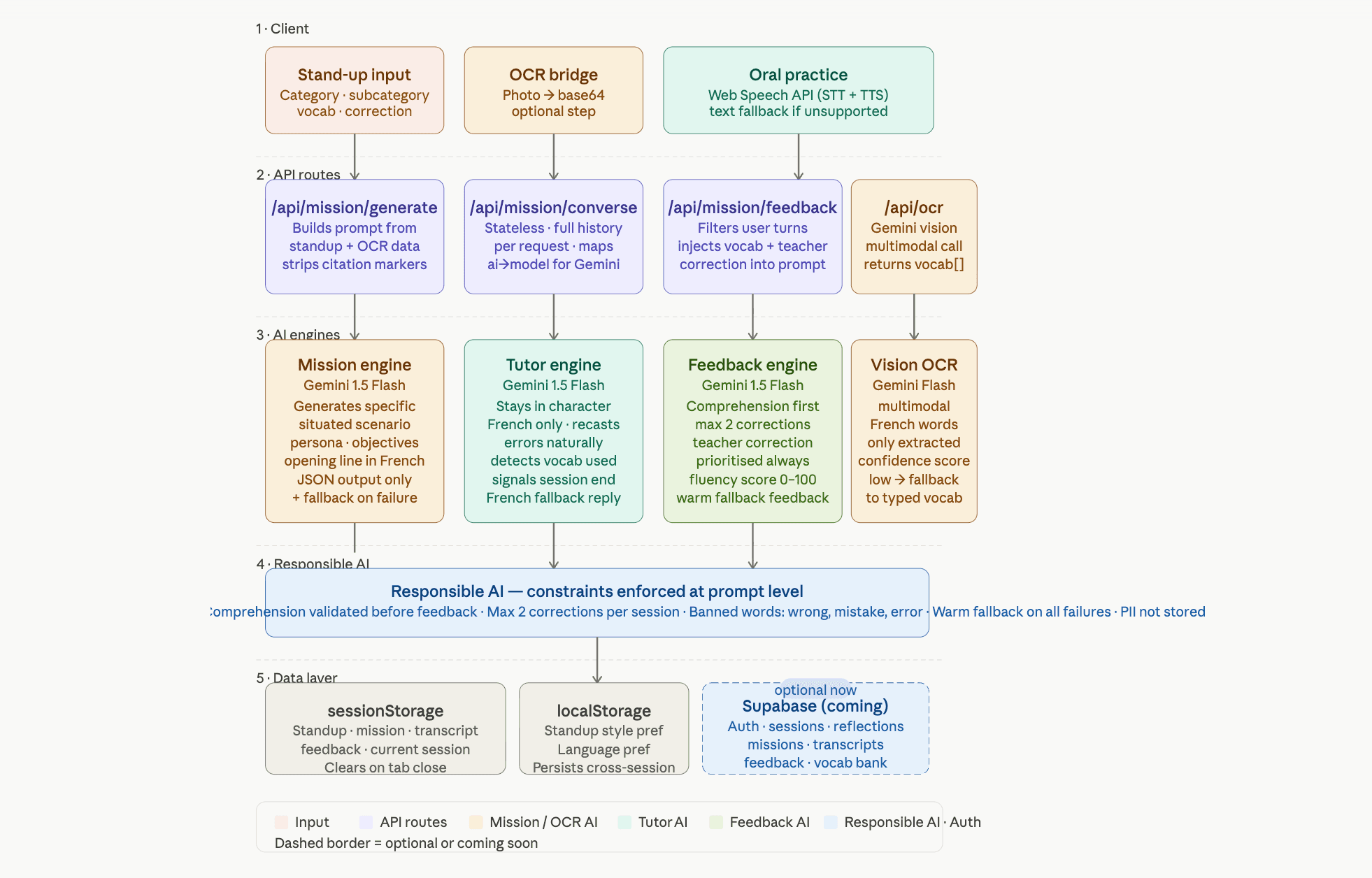
All three prompts include explicit citation marker stripping to handle Google Search grounding artifacts, and each route returns a warm, pedagogically sound fallback on any failure rather than exposing a raw error to the learner.
The Responsible AI Consideration
This section is central to how I think about building AI products:
- Pedagogical safety by design: The correction system is constrained at the prompt level. The feedback engine is instructed to never use the words "wrong", "mistake", "error", or "incorrect". It cannot open with a correction. It must validate comprehension before anything else. These constraints are not soft guidelines — they are enforced through system prompt architecture.
- Emotional safety for vulnerable users: Language learners are anxious. Anxiety increases when they make errors in front of others. The entire product is designed around private, low-stakes practice — no social features, no leaderboards, no comparison to other learners. The UI language is warm and specific, not clinical.
- Honest limitations: The app communicates transparently when AI grounding data is thin for smaller cities in the OCR feature, and returns meaningful fallback responses rather than hallucinated content when generation fails.
- Access by design: One of my two user personas is based in Ghana, not France. The PWA format (no app store, no region restriction, works offline after initial load) was chosen deliberately to remove distribution barriers for non-European learners. This is a product decision with a responsible AI rationale behind it.
Competitive Differentiation
| Feature | Parlez Bien | Duolingo | Jumpspeak | Lingvist |
|---|---|---|---|---|
| Uses classroom content | ✓ | ✗ | ✗ | ✗ |
| Takes teacher corrections | ✓ | ✗ | ✗ | ✗ |
| Generates custom missions | ✓ | ✗ | ✗ | ✗ |
| Oral production with real-time STT | ✓ | Limited | ✓ | ✗ |
| Soft correction (comprehension first) | ✓ | ✗ | ✗ | ✗ |
| Works offline (PWA) | ✓ | ✓ | ✗ | ✗ |
The gap all competitors share: none of them start with today's classroom. None of them take a teacher's correction as an input. None of them generate a scenario from a student's own notes. That is the gap Parlez Bien fills.
Outcomes and Validation
- Live and deployed at parlezbien.vercel.app.
- Unprompted positive feedback from classmates in a Montpellier French language programme within days of first sharing.
- Active beta test cohort forming organically from student peers.
- The AI mission generation produces contextually specific, pedagogically appropriate scenarios on every call — validated through structured testing across CEFR levels, multiple budget constraints, and French/English output modes.
What I Would Do Differently
I built the frontend before establishing a full architecture document. The product works, but retrofitting the documentation revealed gaps in error state handling — particularly edge cases in the Web Speech API where recognition ends without a result. In future projects I will define error states in the API contract before writing any interface code.
I would also add Supabase authentication earlier. The stateless sessionStorage architecture was the right call for the MVP validation sprint, but the absence of persistence means I cannot track whether users return, which is the most important retention signal at this stage.
What's Next
Supabase auth and database integration are currently in progress, which will enable:
- Session History & Streak Tracking: Gamification elements centered on consistency, not scoreboards.
- The Correction Thread: A visual timeline showing when specific grammatical errors appeared and disappeared from a learner's sessions over time.
- Mission Replay with Delta: Allowing students to replay a previous mission and see their quantitative improvement score.
- Weekly Debrief: An AI-generated summary each Sunday — mimicking a teacher reviewing your entire week, providing immense value to independent learners.